I. What's a Spring ?
Spring is an open-source, enterprise Java application framework built around the core concept of Inversion of Control (IoC) and Dependency Injection (DI). It decouples application components, allowing developers to focus on core business logic while Spring handles boilerplate concerns like object management, database transactions, and security.
A. Inversion of Control (IoC) & Dependency Injection (DI)
What it is: Instead of classes creating their own dependencies using new, the control is inverted to the Spring IoC Container (or ApplicationContext).
Why it matters: Loose coupling, high modularity, and easy unit testing (since dependencies can be easily mocked).
B. Aspect-Oriented Programming (AOP)
What it is: Separates cross-cutting concerns (logging, security, transaction management) from core business logic.
How it works: Spring uses dynamic proxies to intercept method calls and execute advice (e.g., automatically handling @Transactional commit/rollback).
C. Bean Lifecycle Management
What it is: Spring manages the entire lifecycle of objects (Spring Beans) — from instantiation and dependency injection to initialization callbacks (@PostConstruct) and destruction (@PreDestroy).
Default Scope: Singleton (one instance per IoC container). Other scopes include Prototype, Request, and Session.
II. Bean Scope Use cases
Singleton (default), prototype, request, session.
2.1. Prototype scope
A new instance is created every single time the bean is requested from the Spring container (e.g., via @Autowired or getBean()).
Rule of Thumb: Use Prototype for stateful, non-thread-safe objects or short-lived tasks where instances should not share state.
Case A: Heavy Batch Processing / File Exporters (Stateful Helpers)
When generating complex reports (like PDF or Excel exports), you might track local state (page numbers, current line, buffer) inside the exporter bean. If two threads share a Singleton exporter, their state corrupts.
@Component
@Scope(ConfigurableBeanFactory.SCOPE_PROTOTYPE)
public class PdfReportGenerator {
    private final List<String> pageContent = new ArrayList<>(); // Stateful!

    public void addSection(String content) {
        this.pageContent.add(content);
    }

    public byte[] generate() {
        // Compile PDF using local pageContent...
        return new byte[0];
    }
}
Case B: Multi-threaded Task Objects / Workers
If you use Spring's @Async or an ExecutorService to process concurrent jobs, each worker task needs its own isolated state.
@Component
@Scope("prototype")
public class DataImportWorker implements Runnable {
    private String fileChunk; // Set per job instance

    public void setChunk(String chunk) {
        this.fileChunk = chunk;
    }

    @Override
    public void run() {
        // Process this isolated chunk...
    }
}
2.2. Request scope (@Scope(value = WebApplicationContext.SCOPE_REQUEST, proxyMode = ScopedProxyMode.TARGET_CLASS))
A new instance is created for every single incoming HTTP request and destroyed when the request completes.
Rule of Thumb: Use Request scope for data that is specific to a single API call/user hit and needs to be passed across multiple layers (Controller $\rightarrow$ Service $\rightarrow$ Repository) without explicitly cluttering method parameters.
(Note: proxyMode is required when injecting a short-lived scoped bean into a long-lived Singleton service).
Case A: Per-Request Audit Logging / Request Context
Tracking metadata like traceId, client IP address, user agent, or request start time throughout the entire execution pipeline of a single HTTP hit.
@Component
@RequestScope // Shortcut for @Scope(value = "request", proxyMode = ...)
public class RequestContext {
    private String traceId;
    private String clientIp;
    private long startTimeMillis;

    // Getters and Setters
}

// Automatically injected into Singleton services, but holds request-specific data
@Service
public class OrderService {
    private final RequestContext requestContext;

    public OrderService(RequestContext requestContext) {
        this.requestContext = requestContext;
    }

    public void processOrder() {
        // Automatically logs the correct traceId for the current thread's HTTP request
        log.info("Processing order for Trace ID: {}", requestContext.getTraceId());
    }
}
Case B: User Authentication Context / API Token Claims
Parsing a JWT once in a Filter/Interceptor, storing user details inside a Request-scoped bean, and accessing those user details anywhere deep in the service layer.
@Component
@RequestScope
public class CurrentUserContext {
    private String userId;
    private List<String> roles;

    // Populated by JwtAuthFilter during request entry
}
2.3. Session Scope (@Scope(value = WebApplicationContext.SCOPE_SESSION, proxyMode = ScopedProxyMode.TARGET_CLASS))
A new instance is created for a specific HTTP Session and lives across multiple HTTP requests from the same user until the session expires or is invalidated.
Rule of Thumb: Use Session scope for user-specific state in traditional server-rendered web applications (e.g., Spring MVC + Thymeleaf) or stateful web apps.
Case A: E-Commerce Shopping Cart (Traditional MVC Apps)
Holding items added by a user across multiple page reloads before they check out.
@Component
@SessionScope // Shortcut for @Scope(value = "session", proxyMode = ...)
public class ShoppingCart implements Serializable {
    private final List<CartItem> items = new ArrayList<>();

    public void addItem(CartItem item) {
        items.add(item);
    }

    public List<CartItem> getItems() {
        return items;
    }
}
Case B: Multi-Step Form / Wizard Workflows
When a user fills out a complex multi-step application (e.g., Step 1: Personal Info, Step 2: Payment Details, Step 3: Review), a Session-scoped bean holds the draft data until final submission.
@Component
@SessionScope
public class OnboardingWizardState implements Serializable {
    private PersonalInfo step1Data;
    private PaymentDetails step2Data;

    // Retains state as user navigates between steps
}
III. StereoType Annotations (Component Scanning)
Spring uses these annotations to automatically detect, instantiate, and manage Java classes as Beans inside the IoC Container during component scanning.
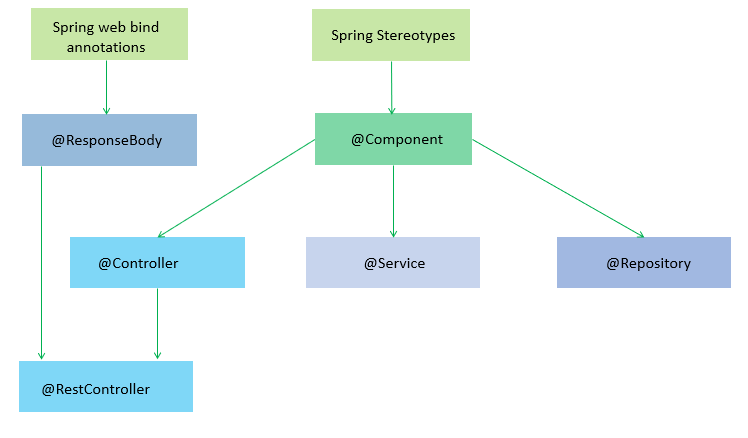
3.1. What's different between @Component and @Service ?
At the core technical level inside Spring, @Service IS a @Component.
If you look at the source code of @Service, it is defined using @Component as a meta-annotation:
@Target(ElementType.TYPE)
@Retention(RetentionPolicy.RUNTIME)
@Documented
@Component // <-- @Service is meta-annotated with @Component
public @interface Service { ... }- @Service: Business Logic Layer and transaction management
@Transactional - @Component: Used for utility classes, helpers, event listeners, or custom tools.
Best Practice: Always use specialized stereotypes (@Service, @Repository,@Controller) for their respective architectural layers. Only use @Component when a class does not fit into any of those three layers.
3.2. The Three Key Features of Spring Boot
3.2.1. Spring Boot Starters
Instead of declaring 5–10 individual libraries for a single capability, Spring Boot bundles them into "Starters":
spring-boot-starter-web: For RESTful APIs (includes Tomcat, Spring MVC, Jackson).spring-boot-starter-data-jpa: For database access (includes Hibernate, Spring Data JPA, HikariCP).spring-boot-starter-security: For authentication and authorization.
3.2.2. Auto-Configuration (@EnableAutoConfiguration)
Spring Boot scans the libraries on your classpath and automatically configures matching Beans.
Example: If it detects the H2 Database library in your pom.xml, Spring Boot automatically configures an in-memory H2 database connection without requiring a single line of configuration code.
3.2.3. Production-Ready Features (Spring Boot Actuator)
Spring Boot includes built-in application monitoring features out of the box (Health checks, Metrics, Environment info, Thread dumps...) via the spring-boot-starter-actuator module, which traditional Spring lacks natively.
3.3. @Value vs @ConfigurationProperties
Both @Value and @ConfigurationProperties are used to read configuration data from configuration files (application.properties or application.yml) into Java classes in Spring Boot.
However, their approach and primary use cases differ significantly:
- @Value:
- Reads individual properties one by one (Property-driven).
- Supported SpEL (Spring Expression Language) via
#{...}syntax
- @ConfigurationProperties:
- Groups properties with a common prefix into an Object (Type-safe Binding).
- Best suited for complex structures (Nested objects, List, Map...).
- Supported Relaxed Binding: Automatically maps
kebab-case,snake_case,camelCase, etc.). - Fully supports JSR-380 / Hibernate Validator (
@Validated).
Details & Practical Examples
Suppose you have the following application.yml file:
app:
  mail:
    host: smtp.gmail.com
    port: 587
    auth-enabled: true
    recipients:
      - admin@example.com
      - support@example.com
Option 1: Using @Value (Reading Individual Values)
@Component
public class MailService {

    @Value("${app.mail.host}")
    private String host;

    @Value("${app.mail.port:25}") // Fallback default value of 25 if app.mail.port is missing
    private int port;

    @Value("#{${app.mail.port} > 1000}") // Uses SpEL to evaluate conditional logic
    private boolean isHighPort;
}
Option 2: Using @ConfigurationProperties (Type-Safe Object Binding).
Binds all properties under a common prefix (in this case, app.mail) into a Java Object.
@Component
@ConfigurationProperties(prefix = "app.mail")
@Validated // Enables Validation on configuration fields
public class MailProperties {

    @NotBlank
    private String host;

    @Min(1) @Max(65535)
    private int port;

    private boolean authEnabled; // Relaxed binding: "auth-enabled" in YAML automatically maps to "authEnabled"

    private List<String> recipients;

    // Standard Getters and Setters (Required for Spring to bind values)
    public String getHost() { return host; }
    public void setHost(String host) { this.host = host; }
    public int getPort() { return port; }
    public void setPort(int port) { this.port = port; }
    public boolean isAuthEnabled() { return authEnabled; }
    public void setAuthEnabled(boolean authEnabled) { this.authEnabled = authEnabled; }
    public List<String> getRecipients() { return recipients; }
    public void setRecipients(List<String> recipients) { this.recipients = recipients; }
}
Then, you simply inject MailProperties into any Service where needed:
@Service
public class MailService {

    private final MailProperties mailProperties;

    // Constructor Injection
    public MailService(MailProperties mailProperties) {
        this.mailProperties = mailProperties;
    }

    public void printConfig() {
        System.out.println("Host: " + mailProperties.getHost());
        System.out.println("Recipients: " + mailProperties.getRecipients());
    }
}
Use @Value for small, individual configurations or when you need SpEL expressions. Use @ConfigurationProperties for structured groups of properties because it supports Type-safety, Relaxed Binding, Validation, and keeps your code cleaner and more maintainable through encapsulation.