I. Project / Package Structure
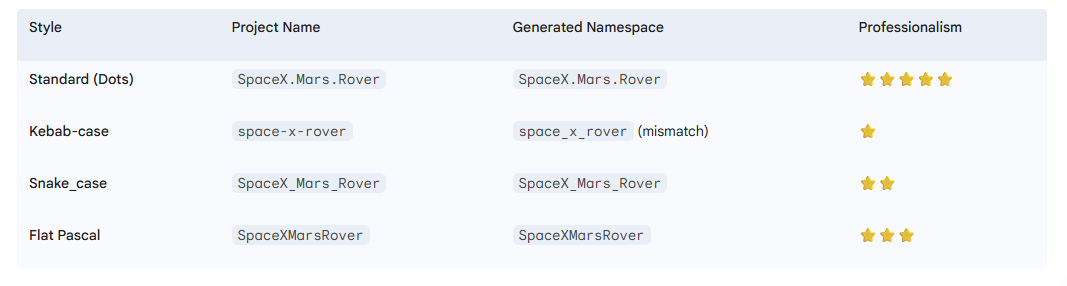
1. Name convention
2. LaunchSettings.json trong Properties
Chỉ Inject ENV VARS
✔️ Khi bạn:
- Chỉ tồn tại khi chạy local
- Override mọi
appsettings.*.json - Bấm F5 / Run trong Visual Studio.
- Chạy:
dotnet run --launch-profile "MyDotNet9App"
❌ KHÔNG dùng khi:
- Deploy production (Production KHÔNG đọc file này).
- Docker.
- Kubernetes.
- IIS / Nginx thực tế.
{
  "$schema": "https://json.schemastore.org/launchsettings.json",
  "defaultProfile": "MyDotNet9App",
  "profiles": {
    "MyDotNet9App": {
      "commandName": "Project",
      "dotnetRunMessages": true,
      "launchBrowser": true,        // open browser when run command line
      "launchUrl": "swagger",       // with /swagger
      "applicationUrl": "https://localhost:7123;http://localhost:5123",
      "environmentVariables": {
        "ASPNETCORE_ENVIRONMENT": "Development",
        "ConnectionStrings__Default": "Server=.;Database=DevDb"
      }
    },

    "IIS": {
      "commandName": "IISExpress",
      "launchBrowser": true,
      "environmentVariables": {
        "ASPNETCORE_ENVIRONMENT": "Development"
      }
    }
  }
}
vì sao Production không chạy appsettings.json. Vì Best Practice trên PROD là phải run file dll, biến môi trường và tham số
dotnet MyApp.dll \
  --ConnectionStrings:Default="Server=prod;Database=ProdDb" \
  --Jwt:Issuer="mycompany"
3. Order startup
Program.cs - "điểm vào" của ứng dụng
ServiceCollectionExtensions.cs không tự chạy, nó chỉ được gọi từ Startup.cs
Program.cs
↓
Startup.cs
├─ ConfigureServices(...)
└─ Configure(...)
↓
Middleware pipeline
↓
Nhận request HTTP
ConfigureServices làm gì ?
- ServiceCollectionExtensions là helper cho ConfigureServices, giống extract methods, trành
startup.csviết quá nhiều codes - Đằng ký Dependency Inject
- Add
- Controllers
- DBContext
- Authentication
- swagger
- Custum Services
Configure làm gì ?
public void Configure(IApplicationBuilder app, IWebHostEnvironment env) {
  if (env.IsDevelopment())   {
      app.UseDeveloperExceptionPage();
  }
  app.UseRouting();
  app.UseAuthentication();
  app.UseAuthorization();
  app.UseEndpoints(endpoints =>   {
      endpoints.MapControllers();
  });
}- Build Middleware pipeline
- Request đi qua những middleware nào
- Thứ tự middleware (rất quan trọng)
Middleware pipeline
Request
↓
UseException
↓
UseRouting
↓
UseAuthentication
↓
UseAuthorization
↓
Controller
↓
Response
Tóm tắt
- Program.cs bắt đầu
- CreateBuilder()
- Load appsettings.json
- Load environment
- Setup logging
- builder.Services.AddXXX()
- AddControllers
- AddSwagger
- AddApplicationServices (extension)
- builder.Build()
- Build DI container
- app.UseXXX()
- Setup middleware pipeline
- app.MapControllers()
- app.Run()
- App sẵn sàng nhận request
Program.cs
Project .NET 5, using CreateHostBuilder
public class Program {
    public static void Main(string[] args)    {
        CreateHostBuilder(args).Build().Run();
    }
    public static IHostBuilder CreateHostBuilder(string[] args) =>
        Host.CreateDefaultBuilder(args)
            .ConfigureWebHostDefaults(webBuilder => {
                webBuilder.UseStartup<Startup>();
            });
}
Project .NET 9 (Web API), using WebApplication don't need setup order load appsettings.json or environmentVariables
var builder = WebApplication.CreateBuilder(args);
// ==========================
// 1. CONFIGURATION & SERVICES
// ==========================
// Add framework services
builder.Services.AddControllers();
builder.Services.AddEndpointsApiExplorer();
builder.Services.AddSwaggerGen();
// Add custom services (extension)
builder.Services.AddApplicationServices();
// ==========================
// 2. BUILD APP
// ==========================
var app = builder.Build();
// ==========================
// 3. MIDDLEWARE PIPELINE
// ==========================
if (app.Environment.IsDevelopment()) {
    app.UseSwagger();
    app.UseSwaggerUI();
}
app.UseHttpsRedirection();
app.UseAuthentication();
app.UseAuthorization();
app.MapControllers();
// ==========================
// 4. RUN APP
// ==========================
app.Run();
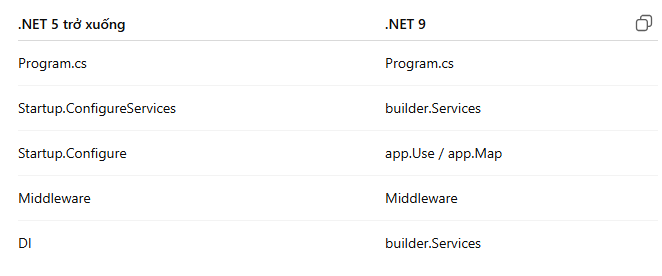
Mapping sang Startup.cs
II. Nuget offline
- Online: copy
'%userprofile%\.nuget\package' - Offline: place in a folder:
c:\nugetrepo - Offline: update
'nuget.config'
<?xml version="1.0" encoding="utf-8"?>
<configuration>
  <packageSources>
    <add key="MyOfflineRepo" value="C:\nugetrepo" />
  </packageSources>
</configuration>- Offline: run
'dotnet restore --source c:\nugetrepo' - Offline: run
dotnet build
III. Localization with .resx
Cách tốt nhất để tạo và sử dụng tệp Resources/AppStrings.resx là thông qua Visual Studio (hoặc Rider) để tận dụng tính năng tạo lớp truy cập chuỗi (Strongly-Typed Resource Accessor) tự động. Phức tạp và rắc rối hơn Java, bên Java chỉ cần file text .properties và nội dung là name = value.
File mặc định sẽ là English, có thể đặt tên AppStrings.en.resx, Restful nên dùng IStringLocalizer
- AppStrings.resx
- AppStrings.de.resx
- AppStrings.fr.resx
- AppStrings.it.resx| Cách | Đề xuất | Ưu điểm | Nhược điểm |
|---|---|---|---|
| IStringLocalizer + Factory | Có | hỗ trợ DI, tự động culture | Cần config chút |
IStringLocalizer<T> | Có | Rất sạch, dễ test | Phải tạo class dummy |
| Strongly-typed class | Không | Intellisense tốt | Phải set Culture thủ công |
| ResourceManager | Không | Không cần DI | Cũ, khó test |
Cách dùng thì có 4 cách nhưng khuyến khích 2 cách đầu
- Add thư mục
Resourcesvàocontext, chứ không mặc định nhưJavavà set default language trongstartup.cs
IV. Extension Methods
Extension Method (Phương thức mở rộng):
Là một loại phương thức đặc biệt trong C# (và .NET) cho phép bạn thêm các phương thức mới vào một lớp (class), cấu trúc (struct), hoặc giao diện (interface) hiện có mà không cần phải:
- Sửa đổi mã nguồn gốc của lớp đó.
- Tạo lớp con kế thừa từ lớp đó.
- Biên dịch lại lớp gốc.
using System;
using System.Text.RegularExpressions;
// Step 1: Create a static class
public static class StringExtensions {
    // Step 2: Create a static method with 'this' keyword
    public static bool IsEmail(this string input)   {
        if (string.IsNullOrWhiteSpace(input)) {
            return false;
        }
        string pattern = @"^[^@\s]+@[^@\s]+\.[^@\s]+$";
        return Regex.IsMatch(input.Trim(), pattern);
    }

    // Another useful extension: Capitalize first letter
    public static string Capitalize(this string input) {
        if (string.IsNullOrEmpty(input)) {
            return input;
        }
        return char.ToUpper(input[0]) + input.Substring(1).ToLower();
    }
}
Cách Dùng
class Program {
  static void Main()  {
    string email = "john.doe@example.com";
    string name = "hello world";
    // These methods don't exist in System.String, but we can call them!
    Console.WriteLine(email.IsEmail());        // True
    Console.WriteLine("bad-email".IsEmail());  // False
    Console.WriteLine(name.Capitalize());      // Hello world
    // Works with null (be careful!)
    string nullString = null;
    Console.WriteLine(nullString.IsEmail()); // False (no NullReferenceException)
  }
}
V. Either, EitherAsync, Task<Either<...>>, Validation and LINQ
1. Either
Either<Left, Right>, Either<IError, Unit>
Left, Right chỉ là 2 giá trị nhưng có thể tận dụng vào validation
Left: false, Right: true (pass validation)
Either,Unit của thư viện LanguageExt.
IError: là Interface tự định nghĩa.
1.1 Unit = "void nhưng có thể truyền đi"
- Định nghĩa
- Chỉ có 1 giá trị duy nhất
- Không mang data
- Chỉ mang ý nghĩa: “thành công”
- Khi nào dùng
Unit- Không nên:
Either<IError, void> // không compile - Đúng cách:
Either<IError, Unit>
- Không nên:
- Example:
  Either<Error, Unit> ValidateUser(string userId)
  {
    if (string.IsNullOrEmpty(userId))
      return Error.New("Invalid user");
    return Unit.Default;
  }
2. LINQ: Select ... from ... where
var result = await (
          from _ in ValidationHelper.ValidateMandatoryParameter(query.UniqueId, query.RepositoryUniqueId).ToAsync()
          from _2 in SecurityHelper.ValidateId(query.UniqueId).ToAsync()
          from _3 in SecurityHelper.ValidateId(query.RepositoryUniqueId).ToAsync()
          from binaryResponse in service.GetDocument(query).ToAsync()
select binaryResponse);_là discardUnitchỉ mang ý nghĩa PASSselect binaryResponsequyết định kết quả cuối
Model
Right ──▶ Right ──▶ Right ──▶ Right(binaryResponse)
│
└── Left(error) ──▶ STOP
result:rightkhi tất cả là rightresult:left, chỉ cần một bước trả left thì pipeline dừng lại vàresultlàleftvới lỗi đó.pipeline: một chuỗi các bước xử lý dữ liệu, chạy theo thứ tự, đầu ra của bước trước là đầu vào của bước sau (giống như dây chuyền sản xuất), fail fast (bước nào fail thì dừng ngay)